Tiered Unit Pricing
Quantity breaks that reprice the whole cart, not just the last unit.
Native Shopify volume discounts often only discount the units above a threshold. Discount Prime reprices every unit once the tier is reached, which matches what shoppers actually expect - and converts better.
What you get
Full-cart repricing
Hit 5 units, all 5 get the tier price. No confusing math at checkout.
Per-variant or per-collection tiers
Run brackets at any granularity that fits your catalog.
Min/max per bracket
Cap wholesale brackets so retail and B2B can coexist cleanly.
How it works
- 1Define brackets (e.g. 1–4, 5–9, 10+) with a price per unit.
- 2The cart widget shows shoppers how close they are to the next tier.
- 3On checkout, every unit is repriced to the active bracket.
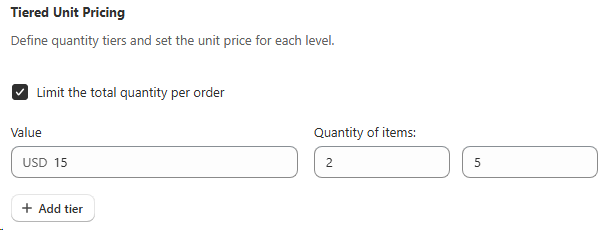
Min & max quantity per order
Limit the total quantity per order
Inside every Tiered Unit Pricing campaign you can turn on Limit the total quantity per order and define both a minimum and a maximum number of items the shopper must buy for the tiered unit price to kick in. Shoppers below the minimum stay on the regular price, shoppers above the maximum keep the last tier price for any extra units, so you stay in full control of how deep the discount can go on a single order.
- • Minimum quantity: the threshold that unlocks the tiered unit price.
- • Maximum quantity: the cap that protects margin on very large orders.
- • Original price fallback: if the product's regular price is already lower than the tier price you defined, Discount Prime keeps the original product price as the base, so the shopper never pays more than the listed price.
Per-campaign sales badge
Pick a sales badge tuned to each Tiered Unit Pricing campaign
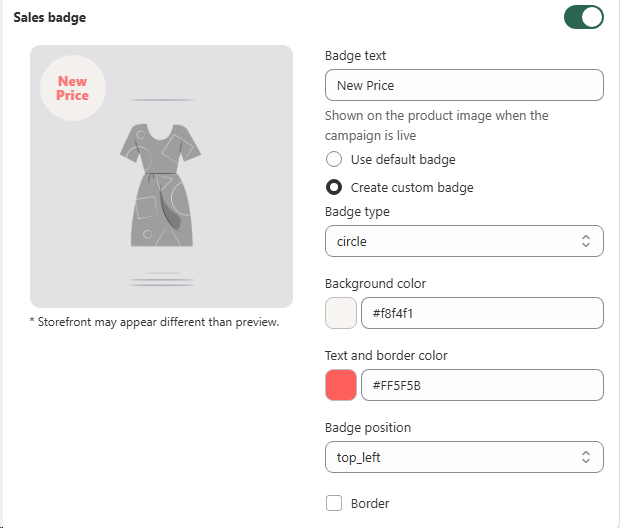
Every Tiered Unit Pricing campaign has its own Sales badge block, so you can light up the product image with a badge that belongs to that specific campaign, not a generic store-wide sticker. Toggle it on, write the badge text, pick Use default badge for the shop preset, or Create custom badge to fully style this one.
- • Badge text: any short label (e.g. "New Price", "Tier Deal", "Bulk Save").
- • Badge type: circle, ribbon, corner, pennant and more.
- • Colors: background, text and border colors, with optional border toggle.
- • Position: top_left, top_right, bottom_left or bottom_right on the product image.
Product targeting
Use metafields to choose which products join this campaign
If you want to target products by metafield instead of collections, Product Metafield Sections let you pick variants by any metafield condition so the right catalog slice is included automatically.
Learn about Product Metafield SectionsBest for
Volume-driven catalogs and wholesale stores.