Buy X Get Y (BOGO)
From classic BOGO to multi-step gift ladders with popup and floating-button widgets.
Configure straightforward 'buy 1 get 1' offers or chain rules into ladders like 'spend €80 add a free serum, spend €120 add a free travel kit'. A popup and floating button drive attach rate without theme edits.
Watch it in action
Buy X Get Y (BOGO) walkthrough
More walkthroughs on the @DiscountPrimeApp YouTube channel.
What you get
Quantity + spend conditions
Combine a minimum quantity of qualifying items with an optional minimum spend so the gift only unlocks for the right carts.
Four reward types
Free item, percent off, fixed amount off or buy-X-pay-for-Y - pick the reward shape that fits each campaign.
Widgets included
Popup + floating action button work on any Online Store 2.0 theme.
How it works
- 1Pick the trigger: cart value, product, collection, or quantity.
- 2Pick the gift: a specific variant, any from a collection, or a chooser.
- 3Enable the widget - Discount Prime handles the UI and the discount.
See it in action
Try the live BOGO demo on our sample product.
View Coconut Bath Soak demoCustomer buys conditions
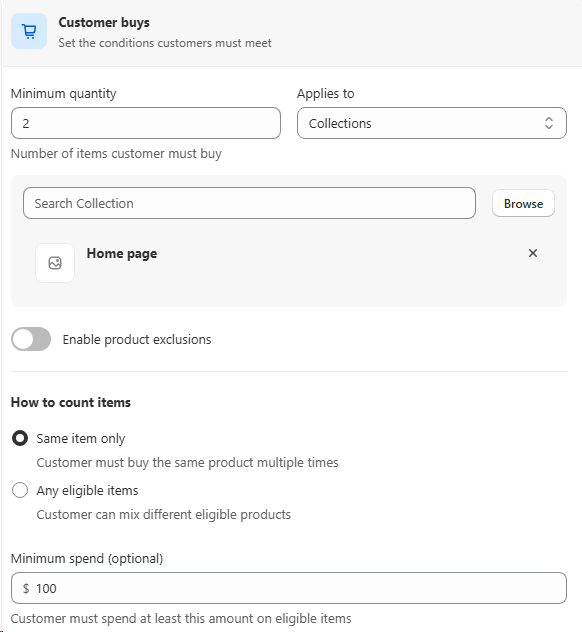
Combine minimum quantity AND minimum spend
BOGO rules don't have to choose between quantity and value. Set a Minimum quantity of qualifying items and an optional Minimum spend on the eligible products. Both conditions have to be met before the gift unlocks, so your offer matches the cart you actually want to reward.
- • Minimum quantity: e.g. buy at least 2 items from the chosen collection.
- • Minimum spend (optional): e.g. spend at least $100 on eligible items.
- • Same item only or Any eligible items: control whether the qualifying units must be the same product or can be mixed across the collection.
Reward applies to
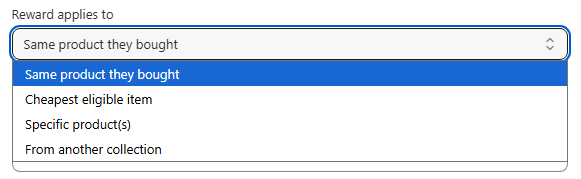
Four ways to define the BOGO reward
Once a customer qualifies, you decide exactly which item gets the discount. Pick from four reward types so the gift always matches your margin and merchandising strategy.
- • Same product they bought: classic "buy 2 get 1 free" of the exact same SKU.
- • Cheapest eligible item: the discount is auto-applied to the lowest-priced qualifying line so your margin is protected.
- • Specific product(s): hand-pick one or more SKUs that become the reward (great for moving slow inventory).
- • From another collection: reward a product from a completely different collection to cross-sell into a new category.
How rewards are applied
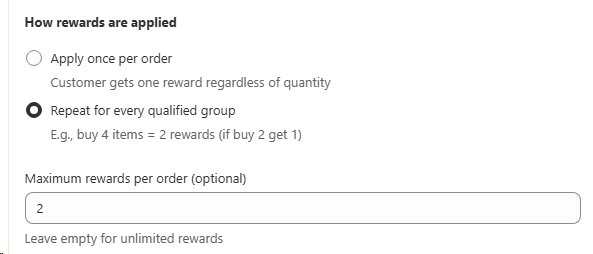
Control how many times the BOGO can be claimed
Decide whether the offer fires once per order or repeats for every qualified group, then optionally set a maximum number of rewards so a single cart can't drain the promotion.
- • Apply once per order: customer gets one reward regardless of how many qualifying items they add.
- • Repeat for every qualified group: e.g. buy 2 get 1, so buying 4 unlocks 2 rewards automatically.
- • Maximum rewards per order (optional): cap the total free items per order, or leave empty for unlimited.
Combination & execution order
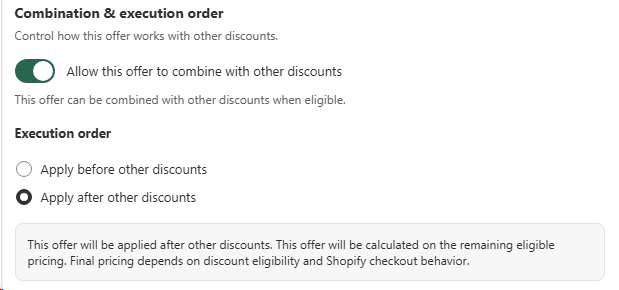
Decide if the BOGO runs before or after other discounts
When the BOGO is allowed to stack with other discounts, you control when the minimum spend is evaluated. Apply the BOGO before other discounts so the qualifying threshold uses original prices, or apply it after so the customer always lands on the most optimized reward.
- • Allow combine with other discounts: toggle on so this BOGO can stack with other eligible offers.
- • Apply before other discounts: minimum spend is checked on original prices, then other discounts reduce the remaining total.
- • Apply after other discounts: other discounts reduce the cart first, then the BOGO is calculated on the remaining eligible pricing for the most optimized reward.
Dynamic reward modal
The BOGO popup adapts to each shopper's cart in real time
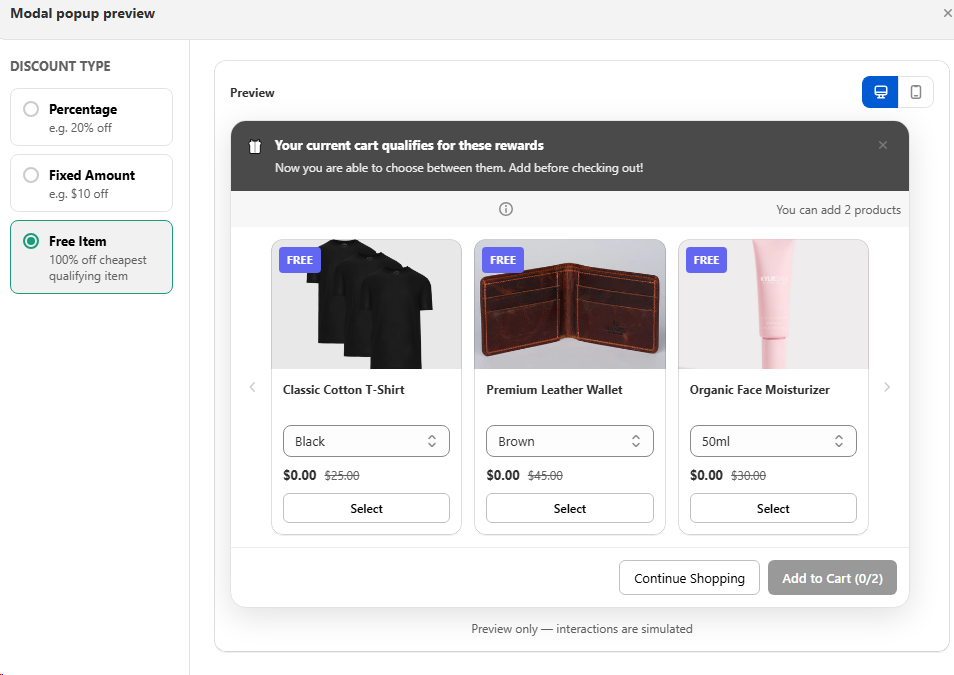
The modal reads the customer's live cart and shows only the rewards they actually qualify for, with the exact number of free items they're allowed to pick. Discount type (percentage, fixed amount, or 100% free item on the cheapest qualifying line) is resolved per shopper, so no one sees a reward they can't claim.
- • Live cart detection: qualifying lines, quantities, and totals are evaluated on every cart change.
- • Allowed reward count: "You can add 2 products" updates automatically based on how many groups the customer has qualified for.
- • Smart reward selection: percentage, fixed amount, or free item (100% off cheapest eligible) is picked to give the shopper the best value.
- • Add-to-cart guard: the CTA shows progress like Add to Cart (0/2) so customers never overclaim.
Markets & customer segments
Coming soonTarget BOGOs by market or customer segment
In upcoming releases you'll be able to limit a BOGO to specific regions or customer groups, so the reward only appears for the shoppers you want to grow. Pair this with Shopify Customer Segments to ship VIP-only gifts, win-back offers, or market-specific promotions.
- • Markets: restrict the offer to chosen countries or regions.
- • Customer segments: target VIPs, returning buyers, or any Shopify segment.
- • Per-segment rewards: different reward type or quantity per audience.

Best for
Brands using gifts to lift AOV and attach rate.