Bulk Price Update
Reprice hundreds of products at once - and roll it back cleanly.
Run sitewide sales without editing every product. Filter by collection, tag, vendor or type, apply a percent or absolute change, schedule it, and Discount Prime automatically reverts the prices when the sale ends.
What you get
Increase or decrease
Run sales or raise prices in bulk - percentage or fixed amount, both directions supported.
Scheduled + auto-revert
Start and end the sale on a schedule; prices snap back automatically.
Price floor protection
Set a minimum final price so a campaign-wide rule never drops products below your margin.
How it works
- 1Pick the products with the filter builder.
- 2Choose the discount type and schedule.
- 3Discount Prime stores the originals and restores them when the window closes.
Increase or decrease - both directions
Bulk price changes go both ways.
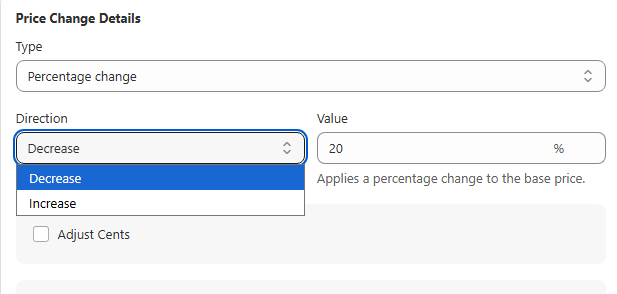
The first capability inside Bulk Price Update is direction. You're not limited to discounting - you can also raise prices in bulk for a defined window. Pick Decrease to run a sale, or Increase to push prices up temporarily (cost hikes, peak-season pricing, premium drops, MSRP corrections). Either way, Discount Prime stores the originals and reverts cleanly when the window ends.
- • Decrease: classic sales, clearance, BFCM, flash discounts.
- • Increase: temporary surcharges, seasonal premiums, MSRP updates.
- • Choose percentage or fixed amount, and schedule a start / end time.
Revert prices instantly
One click back to original prices
No manual price edits needed. When you deactivate a campaign, Discount Prime automatically restores every product to exactly its pre-campaign price - whether you increased or decreased. Zero risk: if a discount went out wrong or the window is over, one click puts everything back the way it was.
- • Automatic original price backup: the original price is stored before any change.
- • Seamless revert: deactivate the campaign and prices snap back without a hitch.
- • No time limits: activate or deactivate a campaign whenever you want.
Price protection
Set a price floor so you never go too low
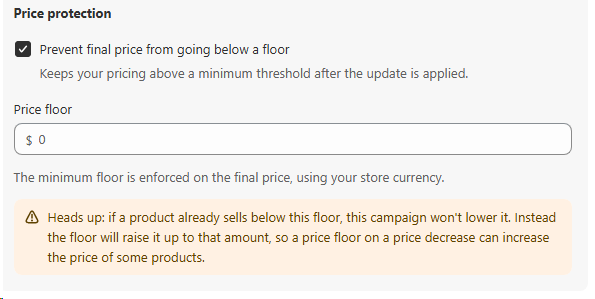
Turn on Prevent final price from going below a floor and Discount Prime enforces a minimum threshold on the final price after your discount is applied. If a percentage or fixed-amount drop would take a product under that floor, the floor wins and the product stops at your minimum. No more accidental margin loss from a campaign-wide rule.
- • One floor, every product: set it once and it applies across the whole bulk run.
- • Enforced on the final price: evaluated after the discount, in your store currency.
- • Heads up: if a product already sells below the floor, the campaign won't lower it. The floor can actually raise those items up to the minimum, so on a price decrease a floor may increase a few prices.
See it in action
Try the live bulk price demo on our sample product.
View Body Butter Trio Set demoBest for
Seasonal sales, clearance, and storewide promotions.