Upsell (Upgrade Offer)
A better version of what they already chose, one tap away.
Available on Prime and Ultimate. Options marked Ultimate require Ultimate.
When the cart or the product page contains a trigger product, Discount Prime offers a better product or a bigger size. One tap swaps the line, with an undo, and an optional incentive can soften the price jump. The offer replaces the line, it does not add another one.
Watch it in actionCreate this campaign
Start from the Upsell (Upgrade offer) card.
- 1Open Discount Prime in your Shopify admin and go to Templates.
- 2Scroll to the Bundles, Cross-sell, Gifts & Upsell group.
- 3Click Create on the Upsell (Upgrade offer) card shown here.
- 4Fill in the campaign settings and publish it. This guide walks you through every block below.
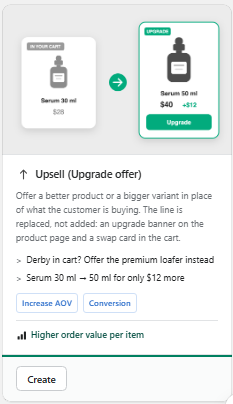
Prefer browsing every recipe first? See the Templates & Use Cases feature.
Watch it in action
Upsell walkthrough
Watch the full walkthrough on the Discount Prime YouTube channel.
Discount Prime YouTubeWhat you get
Two modes
Better product (a higher-priced alternative) or Bigger variant (a larger size of the same product).
Optional incentive
No incentive by default, or a percent off, an amount off, or a cap on how much more the customer pays.
Banner and cart card included
A banner on the product page and a card in the cart, with a one-tap Switch and Undo.
How it works
- 1Pick the trigger: the product that should get an upgrade offer.
- 2Pick the upgrade: a better product, or a bigger size.
- 3Choose the incentive and placement - Discount Prime handles the swap.
See it in action
See the campaign with our team.
Book a walkthroughTwo modes
A better product, or a bigger size.
Pick the kind of upgrade.
- Better product: for example a Derby offered as a Premium Loafer
- Bigger variant: for example a 30 ml serum offered as 50 ml or 100 ml, along a price-ordered option
- The customer keeps their other options after a swap
Upgrade to
Choose where the upgrades come from.
Several ways to define the upgrade.
- Manual picks: up to 6 products
- Pool: a collection, tag, vendor or product type
- Smart ladders: rules find candidates by same type, higher price and better margin (Ultimate)
Incentive
A pure margin play, or a sweetener.
Most upgrades need no discount at all.
- No incentive (default)
- % off or $ off the upgraded line
- Cap the difference: the customer pays at most $X more, and the incentive covers the rest
Phrasing and placement
Say it your way, show it where it counts.
Edit the sentence and choose the surface.
- Phrasing such as "Upgrade to {product} - only {amount} more"
- Product page banner, cart card, or both
- One-tap Switch with Undo, no page reload
- Editable texts and colors in the Upsell widget settings
Safe by design
A swap, never a duplicate.
The trigger line is replaced, not kept. A product bought directly gets no incentive.
Best for
Premium alternatives, size and pack upgrades, closing a price gap with a capped difference, and big catalogs where rules should find the upgrades.