Shipping Discounts
Free-shipping thresholds and live progress bars that convert.
Run free-shipping promotions, flat rates by zone, or threshold-based unlocks. The live progress bar tells shoppers exactly how much more they need to add - a proven AOV lever.
Watch it in action
Shipping Discounts walkthrough
More walkthroughs on the @DiscountPrimeApp YouTube channel.
What you get
Live progress bar
Updates as items are added or removed from the cart.
Minimum spend + cap
Unlock free or discounted shipping above a threshold, and cap the discount so heavy or oversized orders never blow up your margin.
Safety rails & history
Combine rules with other campaigns under clear priorities, and review a full history of every shipping discount that fired.
How it works
- 1Set the rule - fixed amount off, percent off, or free above a threshold.
- 2Pick a target zone or leave it global.
- 3Drop the progress bar block into your theme or let it auto-mount.
Free shipping conditions
Cap how much shipping you cover
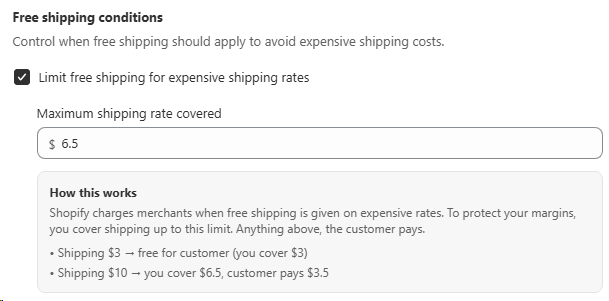
Offering free shipping doesn't have to mean eating every rate Shopify calculates. Turn on Limit free shipping for expensive shipping rates and set a maximum amount you're willing to cover. Anything above that, the customer pays. Your margins stay safe on heavy or far-away orders.
- • Shipping $3: free for the customer (you cover $3).
- • Shipping $10 with a $6.5 cap: you cover $6.5, the customer pays $3.5.
- • No surprise losses: expensive rates never silently come out of your margin.
Discount safety rules
Shipping discount never exceeds the product price
With Do not allow discount larger than product price enabled, the shipping discount you give can never be larger than what the customer actually paid for the products in their cart. If shipping is more expensive than the items themselves, the discount is automatically capped at the product total. You can't accidentally pay the customer to take an order.
- • Cart $4, shipping $10: the shipping discount is capped at $4.
- • Cart $40, shipping $10: full $10 shipping discount applies normally.
- • Margin-safe by default: discounts can never exceed the product value.

Combination & execution order
Stack shipping discounts with the rest of your cart promos
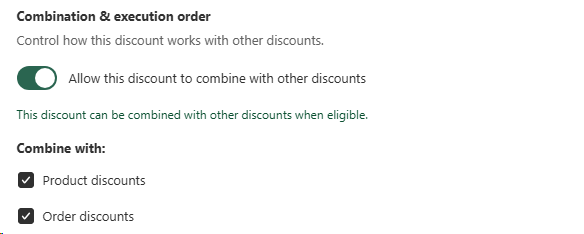
Turn on Allow this discount to combine with other discounts and your shipping offer plays nicely with the other campaigns in the cart. Pick exactly which discount types it should combine with, Product discounts, Order discounts, or both, so shoppers can unlock a bundle deal, a tiered cart promo, and free shipping all at the same time.
- • Combine with Product discounts: stack on top of BOGOs and per-product offers.
- • Combine with Order discounts: stack on top of tiered spend or cart-level promos.
- • Keep it standalone: leave the toggle off and shipping runs as an exclusive offer.
Purchase history conditions
Reward your repeat customers with free shipping
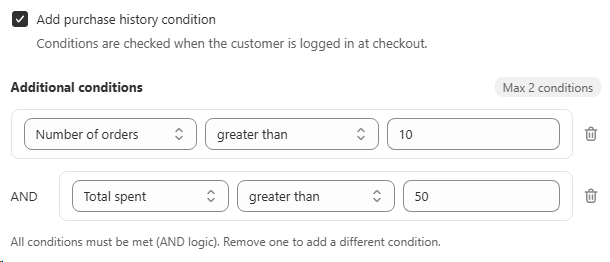
Turn on Add purchase history condition and your shipping discount only unlocks for customers who have actually earned it. Gate the offer by Number of orders, Total spent, or both, so loyal shoppers get free shipping while one-time visitors don't drain your margins. Conditions are checked when the customer is logged in at checkout.
- • Number of orders greater than 10: free shipping for repeat buyers.
- • Total spent greater than $50: reward your higher-value customers.
- • Combine with AND logic: up to 2 conditions both have to pass to unlock the offer.
Minimum purchase requirements
Tiered shipping discounts based on cart minimums
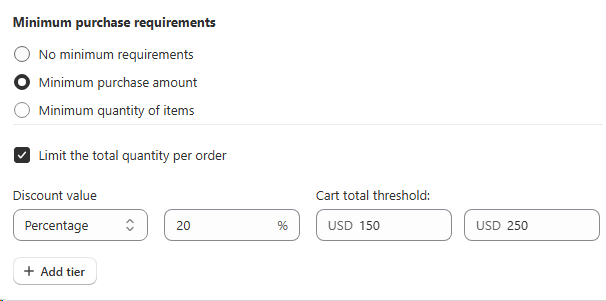
Pick how shoppers qualify: No minimum, Minimum purchase amount, or Minimum quantity of items. Then stack tiers, the more they spend (or add), the bigger the shipping discount. Optional Limit the total quantity per order caps how many units a single order can claim the offer on.
- • Tier 1: cart over $150 unlocks 20% off shipping.
- • Tier 2: cart over $250 unlocks an even larger shipping discount.
- • Add Tier as many brackets as you need. Match the reward to the effort.
Best for
Stores using shipping promos as a primary conversion lever.