Tiered Spend Discount
Spend more, save more - cart-level ladders that lift AOV.
Reward shoppers for filling the cart. Define spend thresholds and the discount each one unlocks - percent off, fixed off, or a free shipping upgrade. A live progress bar shows shoppers exactly how close they are to the next tier.
What you get
Cart-value ladders
Stack multiple thresholds so a single cart can climb to bigger rewards.
Percent, fixed or shipping
Pick the reward type per tier - they don't all have to match.
Auto-applied at checkout
Discount Prime detects the highest unlocked tier and applies it automatically - no codes required.
How it works
- 1Set the spend thresholds and the reward unlocked at each one.
- 2Choose where the progress widget mounts - cart drawer, cart page, or both.
- 3Discount Prime applies the highest unlocked tier automatically at checkout.
Cart spend brackets with a cap
Define a min and max cart total for the discount window
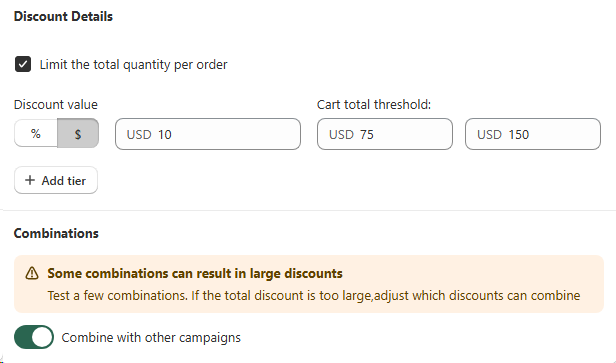
Turn on Limit the total quantity per order and define both a minimum and a maximum cart total threshold so the tiered spend discount only fires inside that bracket. Carts below the minimum stay at full price, carts above the maximum keep the top tier discount without runaway savings. You can stack multiple tiers (e.g. spend $75 get $10 off, spend $150 get $20 off) and switch each tier between percentage and fixed amount.
- • Minimum threshold: the cart total that unlocks the tier.
- • Maximum threshold: the upper bound that caps the discount window.
- • % or $ per tier: mix percentage and fixed-amount rewards across brackets.
Combinations & execution order
Decide if spend tiers apply before or after other discounts
The Combinations block lets you turn on Combine with other campaigns and decide exactly when the spend threshold is evaluated. Apply the tiered spend discount before other discounts so the cart total threshold is measured on original prices, or apply it after other campaigns so the spend tier kicks in only on what the customer actually pays. The built-in heads-up ("Some combinations can result in large discounts") helps you sanity check before going live.
- • Combine with other campaigns: single toggle to allow stacking.
- • Apply before other discounts: threshold checked on the original cart total, then other discounts reduce the remainder.
- • Apply after other discounts: other campaigns shrink the cart first, then the spend tier evaluates the remaining total for the most accurate reward.
- • Built-in warning: Discount Prime flags when stacked rules could create unusually large discounts.
Best for
Brands using AOV ladders to push shoppers past the next basket-size threshold.