Tiered Quantity Discount
Buy more units, save more - quantity ladders done right.
Encourage bigger basket sizes by rewarding unit count instead of cart value. Configure quantity thresholds at the product, variant or collection level and let Discount Prime reprice the cart as shoppers add more.
What you get
Per product or collection
Run ladders at any granularity - one SKU, a vendor, or a whole collection.
Mix-and-match support
Count units across a collection so bundles unlock the same tier.
Cart widget included
Shoppers see the next tier and how many more units to add.
How it works
- 1Define quantity thresholds and the discount each one unlocks.
- 2Pick the scope - single product, variant set, or whole collection.
- 3Discount Prime applies the active tier on every cart update.
Apply to a single product or the whole cart
Pick how quantity is counted: per item or across the cart
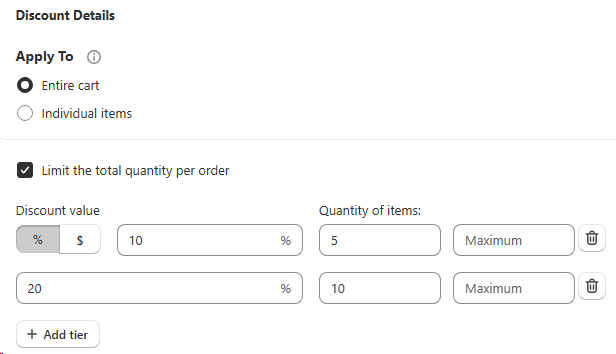
Inside Discount Details the Apply To selector lets you decide how the tier is evaluated. Choose Entire cart to count quantity across every eligible line at once, perfect for store-wide "buy more, save more" promotions. Choose Individual items to reward shoppers per product line, so a customer who buys 5 of the same SKU unlocks the tier even if their full cart is mixed. Either way, you can still cap things with the Limit the total quantity per order toggle.
- • Entire cart: the tier looks at the total number of items in the cart, regardless of SKU.
- • Individual items: each product line is evaluated on its own quantity.
- • Order-level cap: Limit the total quantity per order keeps the reward bounded.
Multiple brackets with a maximum
Stack quantity tiers and cap each bracket with a Maximum
Add as many tiers as you need (10% off at 5 units, 20% off at 10 units, and so on) and give each tier its own Maximum so the reward stops growing past a sensible bound. Mix percentage and fixed amount across rows, and use the trash icon to remove a tier in one click. This is the sweet spot for jeans and apparel merchants, who can run brackets like "buy 5 pairs get 10% off, buy 10 pairs get 20% off" and still cap the order at the maximum so a bulk wholesale buyer doesn't blow up the margin.
- • Unlimited tiers: add as many quantity brackets as the campaign needs with + Add tier.
- • Per-tier Maximum: set an upper quantity bound on each bracket to protect margin.
- • Mix % and $: toggle each tier between percentage and fixed amount independently.
- • Made for jeans / apparel: denim, basics and multi-pack categories get the most lift from layered quantity brackets.
Best for
Catalogs where shoppers naturally buy multiples - consumables, apparel multipacks, accessories.