Dropshipping Pricing
Dropshipping-friendly pricing rules that protect margin on every order.
Thin margins and supplier cost swings make dropshipping risky. Discount Prime links your supplier cost to each product and enforces minimum margins across campaigns, so you never accidentally sell below cost when a supplier price changes.
What you get
Cost-linked pricing
Campaigns reference your supplier cost so discounts are always computed from true landed cost.
Margin floor protection
Set a minimum markup percentage and Discount Prime blocks any campaign that would breach it.
Per-order profit preview
See estimated net margin before the order is placed, accounting for supplier cost, discount, and shipping.
How it works
- 1Import or sync supplier cost into Discount Prime per variant.
- 2Build campaigns with a margin floor instead of a fixed discount ceiling.
- 3Every checkout preview shows true profit so you can adjust rules before they go live.
Three pricing bases
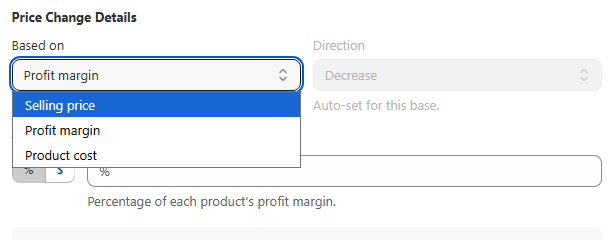
Discount based on selling price, profit margin, or product cost
Dropshipping margins are thin and supplier costs change. Discount Prime lets you choose exactly what the discount is calculated from: the full selling price, the profit margin (price minus cost), or the product cost itself. Each base gives you a different level of control over margin safety.
- • Selling price: the classic approach. Discount is a percentage or fixed amount off the retail price.
- • Profit margin: discount only eats into your margin (price - cost), so your base cost stays untouched.
- • Product cost: base the discount on the supplier cost for advanced cost-plus pricing strategies.
Profit protection
Never let discounts push your profit below the floor
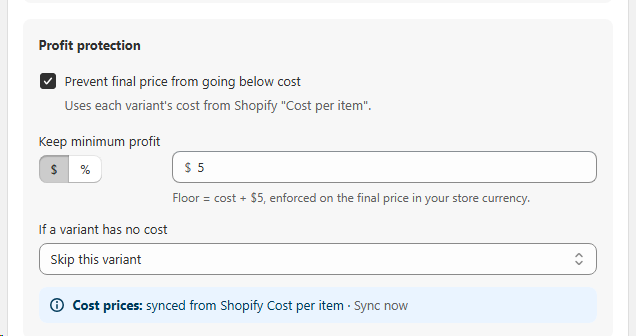
Dropshipping margins are already thin. Discount Prime enforces a hard profit floor on every discounted price, so you never accidentally sell at a loss. It reads each variant's cost directly from Shopify Cost per item, then prevents the final price from dropping below cost plus a minimum profit you define.
- • Cost-based floor: set a fixed amount (e.g., $5) or a percentage above the product cost. The final price is blocked from falling any lower.
- • Synced from Shopify: cost data is pulled automatically from Shopify's "Cost per item" field. One click to sync when costs change.
- • Missing cost handling: if a variant has no cost recorded, choose to skip the discount or still apply it. You're always in control.
Cost markup
Increase product price based on your cost
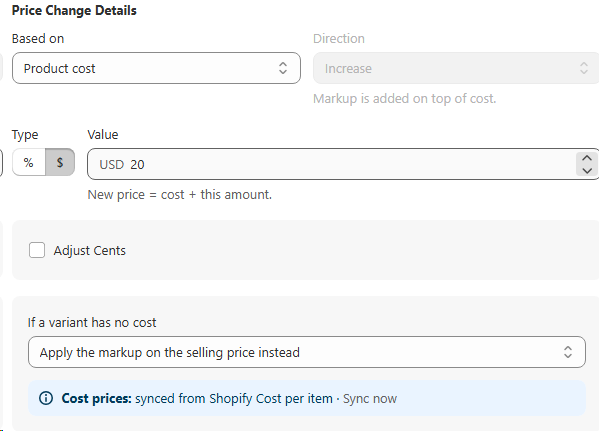
Instead of discounting, you can also raise prices from cost. Set a markup as a fixed amount or a percentage on top of the product cost, and the new price is calculated automatically. Perfect for dropshippers who want consistent margins even when supplier costs change.
- • Markup on cost: choose a fixed dollar amount (e.g., $20) or a percentage. New price = cost + markup.
- • Synced from Shopify: cost data is pulled from Shopify's "Cost per item" field so prices stay current.
- • Missing cost fallback: if a variant has no cost recorded, apply the markup on the selling price instead.
Custom badge
Grab shoppers' attention with custom sales badges
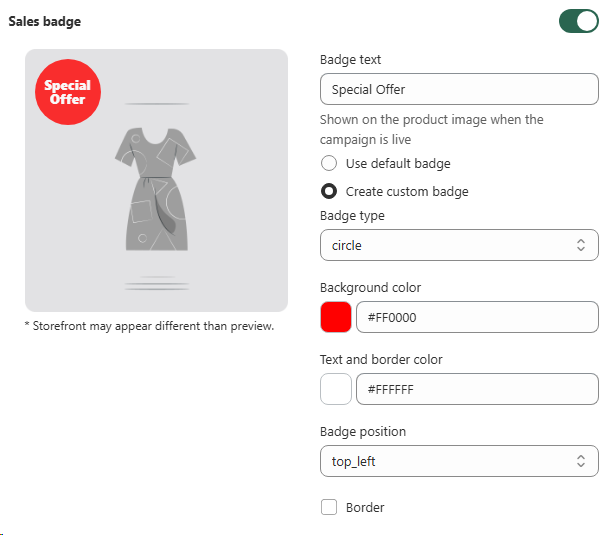
Add eye-catching badges directly on product images to highlight deals and drive urgency. Choose your own text, shape, color, and position to match your brand and make every offer impossible to miss.
- • Custom text & design: write any message and pick from shapes like circle, rectangle, or star. Set background and text colors to fit your store's look.
- • Precise placement: position the badge exactly where you want it on the product image, top-left, top-right, bottom-left, and more.
- • Live preview: see exactly how the badge will appear on your product images before the campaign goes live.
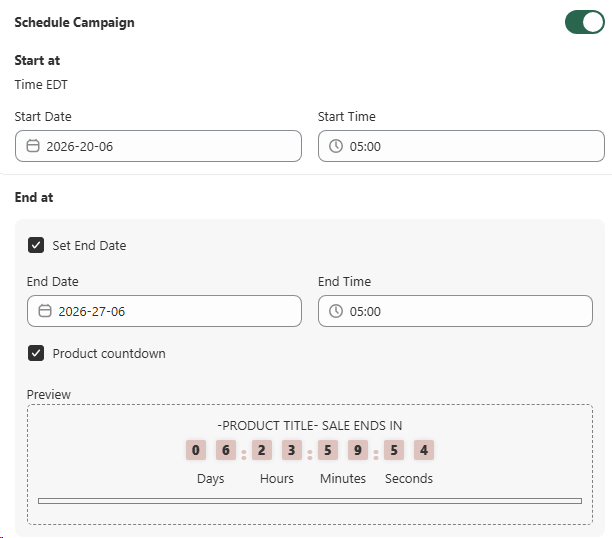
Schedule campaign
Run discounts on your schedule with a built-in countdown timer
Set an exact start and end date for every campaign so your promotions go live and stop automatically. Add a product countdown timer to create urgency and encourage shoppers to buy before time runs out.
- • Date & time scheduling: pick start and end dates with precise times so campaigns run exactly when you want, without manual work.
- • Product countdown timer: display a live countdown on product pages to build urgency and drive faster purchases.
- • Live preview: see how the countdown will look on your store before the campaign starts.
Product targeting
Use metafields to choose which products join this campaign
If you want to target products by metafield instead of collections, Product Metafield Sections let you pick variants by any metafield condition so the right catalog slice is included automatically.
Learn about Product Metafield SectionsBest for
Dropshipping stores managing supplier costs and thin margins.