Conflict Management
One product, one active campaign - no surprise stacking.
Stacked discounts quietly destroy margin. Discount Prime enforces a one-campaign-per-product rule by default and surfaces every overlap before it goes live, so you choose which offer wins.
What you get
Pre-flight overlap check
Every new campaign is simulated against active ones before it can publish.
Manual or rule-based resolution
Pin priorities, prefer higher discount, or resolve case-by-case.
Audit trail
See exactly which campaign won on every product and why.
How it works
- 1On publish, Discount Prime scans every product the new campaign targets.
- 2Overlaps appear in a single review screen with side-by-side discount math.
- 3Your decision is stored as a rule and reapplied automatically next time.
Step-by-step walkthrough
From detecting a conflict to resolving it
Here's exactly what you see in the campaigns grid when a conflict is detected, and how you resolve it in a few clicks.

1. Conflict appears in the campaigns grid
Campaigns with overlapping products are flagged as Conflicted directly in the list, so you spot issues at a glance.
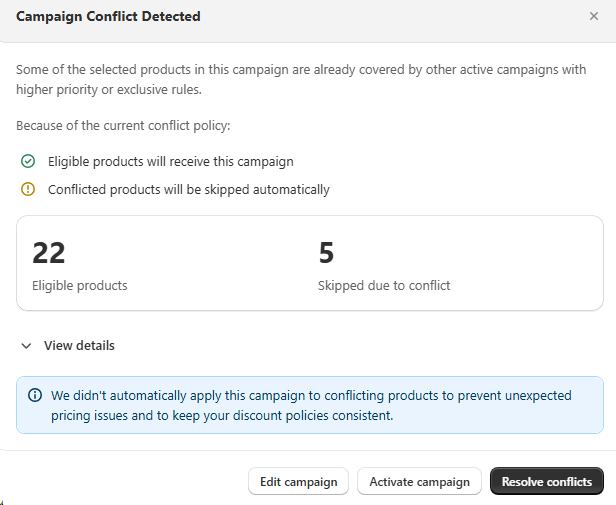
2. Conflict summary modal
Click the campaign to see how many products are eligible vs. skipped, and why nothing was auto-applied.
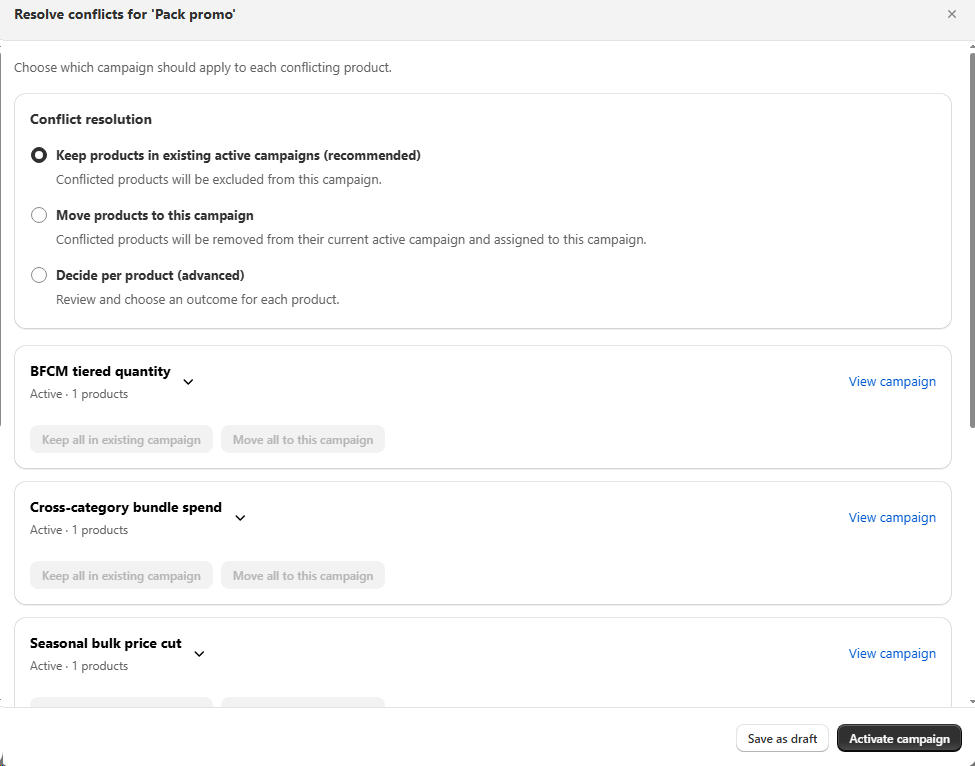
3. Resolve conflicts your way
Choose a global rule, move products into this campaign, or decide per product, then activate.
Best for
Stores running many concurrent promotions.